
In the competitive world of «Call of Duty: Black Ops 7,» players utilizing controllers are often on the lookout for the most effective aim assist settings to enhance their gameplay. The recent updates to aim assist in the game have sparked interest and provided players with fresh opportunities to improve their accuracy.
The adjustments made to rotational aim assist are particularly noteworthy, creating a need to not only select the ideal aim assist type but also to optimize various additional settings for maximum precision. This guide aims to outline the best aim assist configurations tailored for different game modes including Multiplayer, Co-Op Campaign, Zombies, and Warzone.
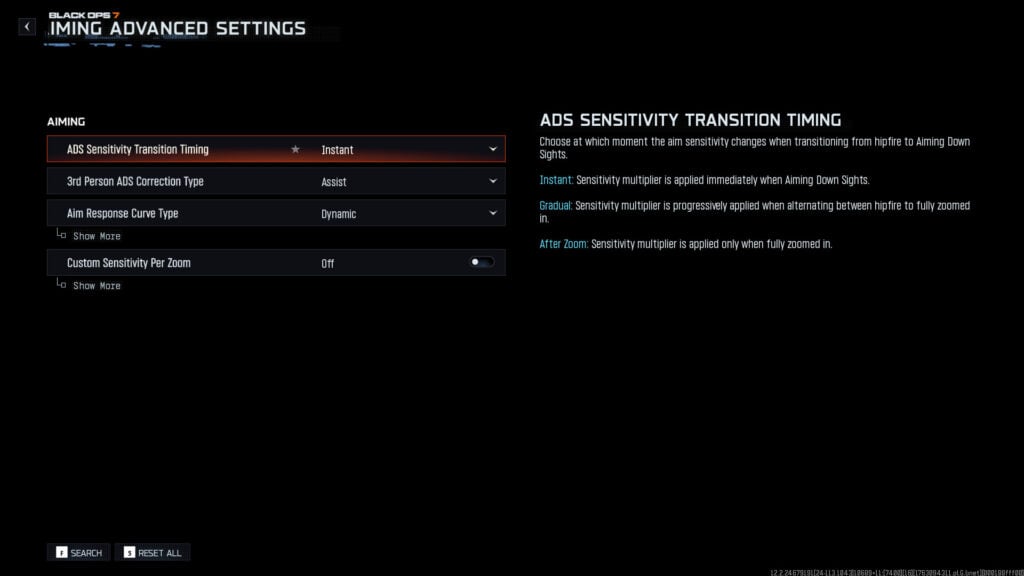
To get started, players should navigate to the Controller settings and focus on the Aiming section. Here are some recommended settings: Ensure that both Target Aim Assist and ADS Aim Assist are enabled. Setting the ADS Sensitivity Transition Timing to «Instant» allows players to swiftly snap onto targets, while selecting a Dynamic Aim Assist Curve Type facilitates rapid responsiveness. Beginners may prefer a Standard curve for a more manageable experience.
For those who feel comfortable with controller aiming, consider personalizing the Custom Sensitivity Per Zoom to align with your preferred levels of zoom and aiming sensitivity.
Next, addressing deadzone settings is crucial for minimizing stick drift and ensuring precise control. It’s essential to experiment with deadzone values, as they can vary depending on the controller model. By activating the Test Stick Deadzone feature, players can assess and modify their settings: set the Right Stick Min slightly above the test value–around 3 is optimal–and for Right Stick Max, aim for a value above 95 to minimize drift. For the Left Stick, keep the Min at 0 and Max around 70 to fully utilize the updated rotational aim assist.
Additionally, graphics settings can have a significant impact on aiming accuracy. Within the View tab of the Graphics settings, consider the following adjustments: a Field of View setting of 110 or lower, enabling Affected ADS Field of View, a Wide Weapon Field of View, and turning both World Motion Blur and Weapon Motion Blur off. These adjustments will help reduce visual disturbance and recoil, allowing players to concentrate better while aiming.
With these recommendations in hand, players can refine their aim assist settings to achieve greater control and precision in «Black Ops 7.» The journey to perfecting one’s gameplay continues, inviting all players to experiment with different settings to find what suits their playstyle best.







