
The movement system and shooting mechanics in the latest iteration of the franchise, Black Ops 7, require players to adopt a well-balanced controller configuration to optimize precision, speed, and overall comfort. If you’re searching for the ideal controller settings to elevate your gameplay in BO7, this guide is tailored for you.
For those engaged in competitive play within Call of Duty, the right controller adjustments can significantly impact your performance. Enhanced aim tracking, fluid movement, and quicker reactions are all attainable with the correct setup. Given the introduction of innovative features such as omnimovement and wall jumping in this installment, the game’s dynamics have evolved, rendering default settings less effective for achieving the desired accuracy and agility.
Whether you aim to climb the ranks or dominate in public matches, the following controller configurations are recommended for a competitive edge in Black Ops 7.
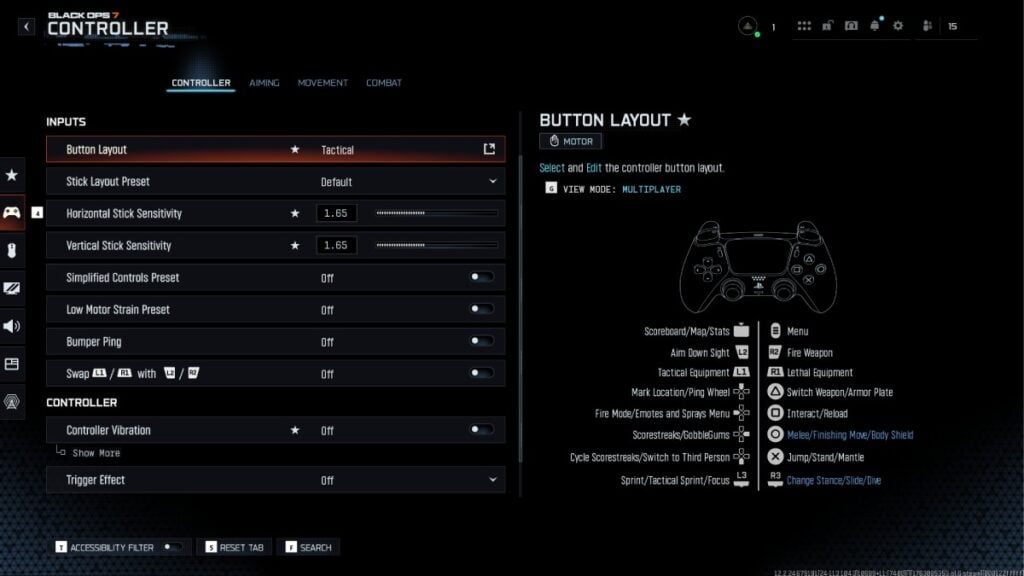
Starting with inputs, configuring your button layout to Tactical tends to enhance gameplay for most players. This setting allows you to crouch or slide using the right stick, providing swift maneuverability while maintaining your aim. The Stick Layout should generally remain set to Default unless you have specific preferences or unique controller features. Adjust your Horizontal and Vertical Stick Sensitivity to between 1.50 and 1.65, experimenting at the firing range for optimal responsiveness. Many skilled players find that a sensitivity of 1.60 strikes a perfect balance between precision flicks and tracking opponents.
Moving on to the controller specifics, it’s advisable to turn off the vibration setting. When it comes to deadzone inputs, ideal values range from zero to three for the left stick, allowing for a tighter response. On newer controllers, this can be set lower, but if you experience drift, it’s worth increasing slightly. For the right stick, aim for a deadzone of three to five, adjusting only if you notice unwarranted movement. For max sensitivity, settings between 98 to 99 ensure heightened responsiveness.
As for aiming settings, it’s crucial to adopt values that enhance your effectiveness in combat. The Look Inversion for on-foot actions should remain Standard, and set the ADS Sensitivity Transition Timing to Gradual to ensure smooth movement between hipfire and aiming down sights. Opting for a Dynamic Aim Response Curve can enhance aiming fluidity, making it easier to track targets, while also activating Target Aim Assist is recommended for those engaging in close-quarter combat scenarios.
In terms of movement settings, it’s best to keep Sprint and Crouch Assists off to maintain full control, especially if you’re looking to master advanced techniques like wall jumping. Keeping movement behavior settings such as Slide/Dive Behavior set to «Tap to Slide» allows for greater responsiveness, while ensuring options like Automatic Airborne Mantle and Sprint Restore remain enabled can help maintain momentum during gameplay.
Finally, in combat settings, establishing behaviors that prioritize efficiency can significantly improve your engagement strategies. For example, setting AIM Down Sight Behavior to Hold and Weapon Mount Activation to a combination of ADS and Melee can facilitate quick weapon handling in intense scenarios.
By implementing these suggested settings, you can gain a substantial competitive advantage in Black Ops 7 and also find these configurations useful within Warzone. While these recommendations provide a solid foundation, remember that every player has their own style, and fine-tuning settings to suit your personal preferences will yield the best results. For further refinements and additional tips, consider exploring comprehensive guides on BO7 settings.







