
DELTARUNE Chapter 3 starts with your involvement in Mr. Ant Tenna’s television show. As you navigate through the game, you’ll eventually come across a green room that houses the Parental Lock system doors. These doors are secured with codes that need to be deciphered within their respective areas.
The arrangement of the clues for these codes can be somewhat challenging to interpret, particularly with the second one. However, we have compiled all the necessary information to help you unlock the door that restricts access to R-rated content.
Here’s everything you need to learn about the Parental Lock system, along with the codes required to unlock it in DELTARUNE Chapter 3.
The Parental Lock System in DELTARUNE
In Chapter 3 of DELTARUNE, the game revolves around a TV show theme, placing you inside a television studio where you can take part in various activities and face enemies. After completing the initial set of challenges, you’ll find yourself in a green room with opportunities for exploration. There are numerous hidden tasks and quests within this space, including chances to open different doors.
Among these doors is one marked with yellow tape and protected by an assistant of Mr. Tenna. Interacting with the assistant gives you a choice to either Engage in battle or Press his buttons. Choosing to fight, I discovered the Off Button in the action menu during the encounter. However, activating this option requires you to have 100 percent TP, necessitating dodging several of the assistant’s attacks first.
Once you attain 100 percent TP, using the Off Button results in an immediate victory. After the battle, proceed through the yellow-taped door to enter a dimly lit room. Continue onward to find three large screens with a console connected to the central one. However, you won’t be able to activate it just yet.
Cross the room to the locked door and follow the prompt to interact with it. This encounter marks your first experience with the Parental Lock System in Chapter 3.
Unlocking the Parental Lock System Doors
At this point in the game, there are two doors secured by the Parental Lock system, with a third becoming accessible later on. To unlock the first two doors, you’ll need to interact with the console on three and six screens, respectively, to obtain the necessary codes. The third door, which appears later in the story, can be opened simply by pressing Enter with the code set to 000000.
Nevertheless, uncovering the codes for these locked doors requires effort, especially given the unique arrangement of the screens.
Code for the First Parental Lock System Door
The code for the first door of the Parental Lock system in DELTARUNE is 213. You can discover this by interacting with the console and using the controller to find hints. Based on how much of the green room you’ve explored, you either control Kris or Susie at the console. Kris has the advantage of being equipped with a sword if he has fully explored the areas behind the S-marked doors and engaged in the alternate version of the sandbox game.
To proceed, gather one of the blue blocks located on the leftmost screen and place it on the designated spot on the rightmost screen. This action reveals a pattern that displays a three on the screen. Furthermore, you’ll create symbols for one and two on the leftmost and center screens, respectively, resulting in a visual representation of 1-2-3 across the three screens.
However, if you try entering those three digits in that exact sequence, you will receive an error notification. This is due to the screens not being arranged chronologically. The leftmost screen should actually be positioned at the center because of the openings on both sides, while the center and right screens are flanked by walls that block access on one side. Therefore, the correct sequence for the code is 2-1-3.
Code for the Second Parental Lock System Door
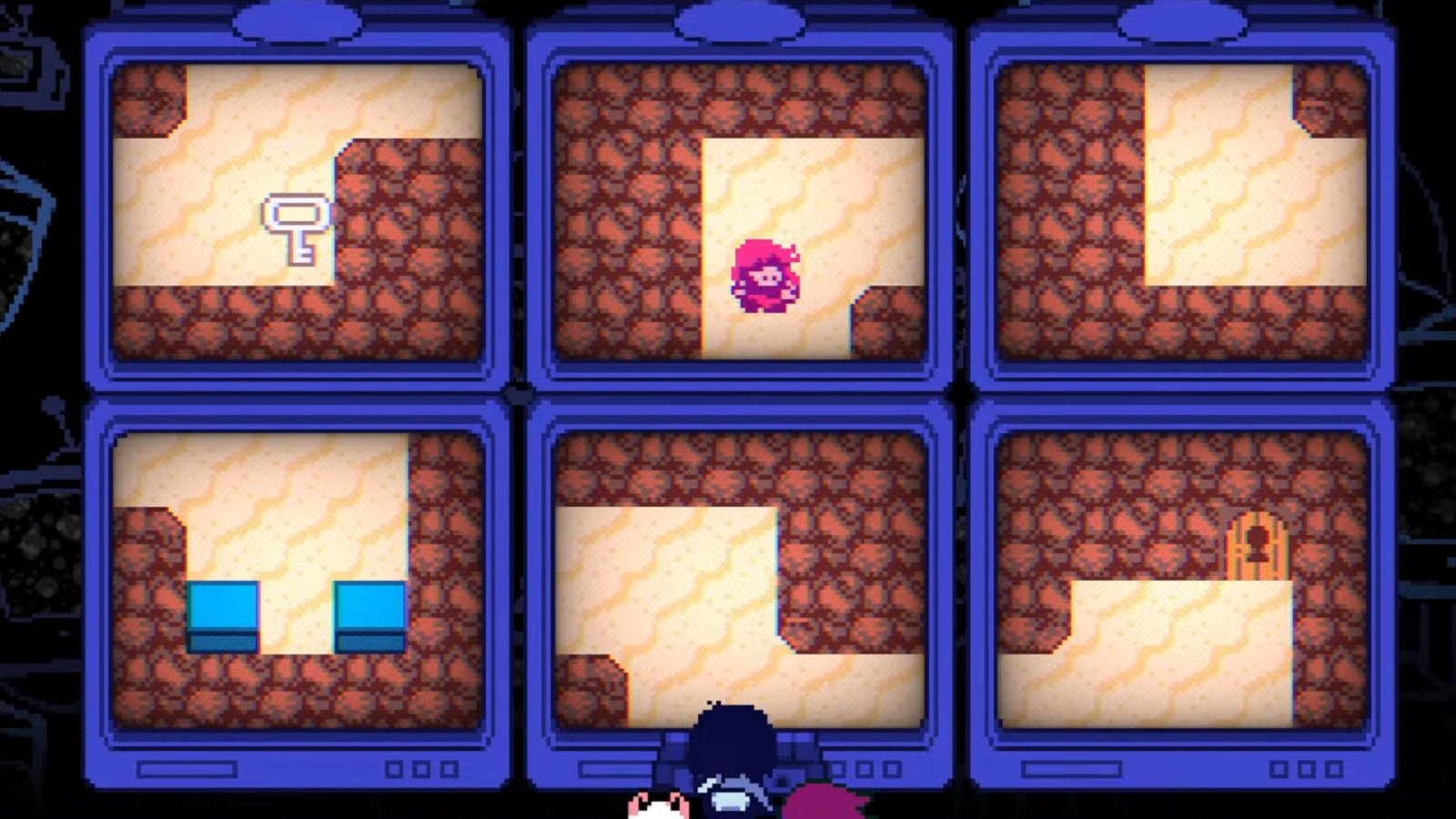
Once you have passed the first Parental Lock door, a brief conversation ensues between Kris, Susie, and Ralsei. Move into the following room to find another console, but this time, it features six screens as opposed to three, meaning the code is also six digits long for this door. The code for the second door is 1225, and figuring it out using the six monitors was quite time-consuming.
Exploring further leads you to another locked room, where interacting will activate the console. Your first task involves a game requiring you to catch a key that continually attempts to escape.
This key is essential to unlocking the door that provides hints for the code necessary to open the Parental Lock system door. However, this can be quite challenging, as the screens are not arranged logically, and the paths can be difficult to comprehend, each display having a unique layout with inventive routes. Meanwhile, the key itself keeps eluding you.
However, you can corner the evasive key using two blue blocks found on one of the screens. I positioned these blocks to narrow the pathway and successfully trapped the key, leaving it with no escape route. Once you catch the key, approach the locked door to unlock it. Enter through the doorway to discover a screen filled with unusual patterns that produce four numbers when arranged correctly.
Deciphering the patterns took a few seconds; however, once I figured it out, I found it helpful to align the walls based on the corners and edges. You might find this technique useful if you’re struggling to unravel the code.







