
In the realm of multiplayer first-person shooters, the importance of precise audio cannot be overstated. For players of Call of Duty: Black Ops 7, optimizing audio settings can significantly enhance gameplay by allowing for quicker recognition of enemy movements and environmental sounds.
To elevate your gaming experience, it’s essential to adjust specific audio configurations tailored to your equipment. Key sounds, including footsteps and gunfire, should be prominent, while distracting elements like music should be minimized. Those seeking the optimal audio setup for Black Ops 7 can benefit from the following guidelines.
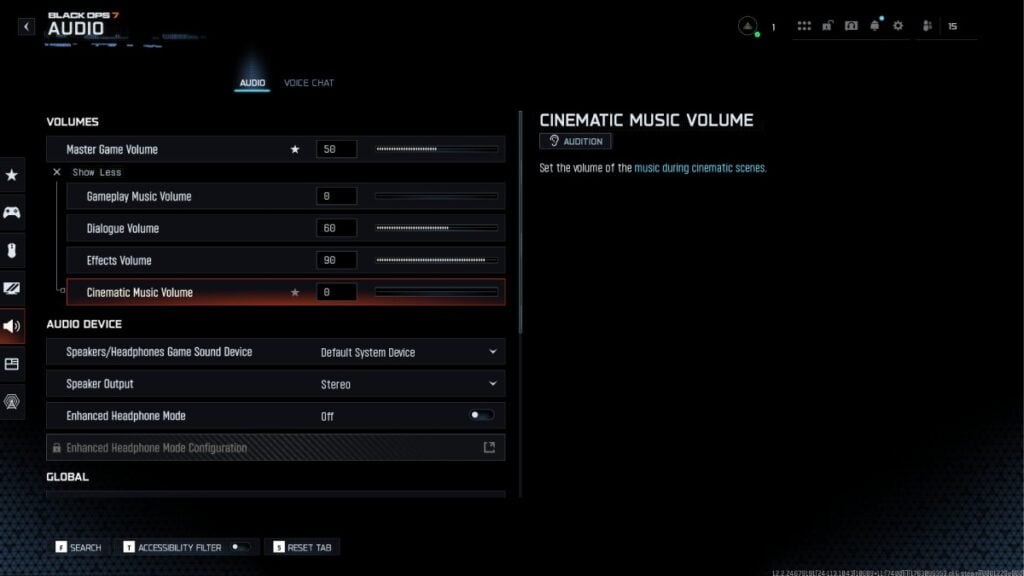
Starting with volume settings, a Master Volume level between 50 and 80 strikes the right balance to ensure critical audio cues are captured without causing discomfort due to excessive loudness. Crucial sounds like footsteps and shooting should be set at a high Effects Volume, ideally between 90 and 100, which is vital for maintaining situational awareness during gameplay. Meanwhile, setting the Gameplay Music Volume to zero ensures players stay focused, and the Dialogue Volume can be adjusted to a range of 50 to 70 to capture key in-game communications without overshadowing the action.
When it comes to audio devices, it’s advisable to set the Speaker Output to Stereo for clear sound delivery. If your headphones support surround sound or spatial audio, feel free to enable those features. However, be mindful that they might sometimes obscure vital sounds, necessitating some experimentation to find the best setting.
In terms of global audio settings, using the Treyarch audio mix will provide an overall favorable experience. Keeping Mono Audio turned off allows for a richer soundscape, while muting licensed music can help reduce background distractions–especially useful if you’re streaming or recording gameplay. Additionally, the «Reduce Tinnitus Sound» feature should be activated to minimize disruptive audio cues from stuns or flashbangs while retaining essential gameplay sounds.
Players also need to configure voice chat settings for effective communication within teams. Setting the Voice Chat Volume to around 25 allows for an awareness of team interactions without overpowering the game sounds. Activating Proximity Chat and other chat options enables fluid social interactions during play.
Microphone settings should be optimized as well, with a level set to around 80. Using a «Push to Talk» mode ensures that your communications remain clear and concise, adding further to your team’s strategic capabilities.
By adopting these tailored audio settings in Black Ops 7, players can enhance their ability to detect and respond to critical in-game sounds, ensuring they never miss a chance to outmaneuver their opponents. With a focus on fine-tuning various aspects of gameplay, each adjustment leads toward a more immersive and effective gaming experience.







