
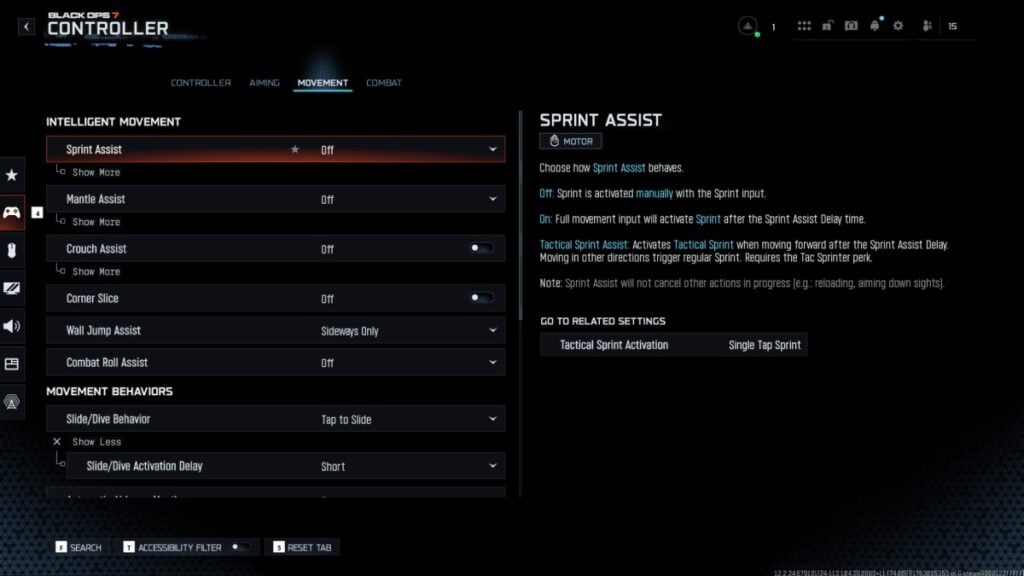
The latest installment of the iconic gaming series, Call of Duty: Black Ops 7, introduces enhanced movement mechanics that significantly elevate player control. Building on the foundation set by its predecessor, BO6, this new version incorporates advanced features such as tactical sprint assists and innovative wall jump dynamics. As a result, players are presented with a wealth of customization options for their in-game movement, making the precise adjustment of settings crucial for outmaneuvering adversaries in high-stakes gunfights.
To optimize your gameplay in Black Ops 7, carefully consider the recommended movement settings. First and foremost, enabling Tactical Sprint Assist is essential, as it allows for better control of sprinting without unintended stops, striking a commendable balance between speed and maneuverability.
Turning off Mantle and Crouch Assists is also advisable, granting players complete command over these actions. While assists may be beneficial for newcomers, disabling them prevents any accidental movements that could disrupt your flow during combat. Similarly, deactivating Wall Jump Assist enables more precise control over wall jumps, which is vital for aggressive movement strategies like jump shooting or bunny hopping. For players still refining these skills, using the Sideways Only option when approaching a wall may provide a helpful alternative.
In terms of movement behaviors, adopting a ‘Tap to Slide’ approach enhances fluidity during gameplay. Coupled with a short Slide/Dive Action Delay, this setting allows for quicker responses in the heat of battle. Furthermore, keeping Wingsuit Activation set to Manual and Wall Jump Activation to Press ensures that players can execute maneuvers with the utmost accuracy, avoiding unintentional activations.
Players using controllers can also benefit from adjusting the Left Stick Min and Right Stick Min Deadzone settings to between one and three, which enhances responsiveness. For those aiming for maximum sensitivity, the left stick should be set between 65 and 75, while the right stick for viewing and aiming should be adjusted to around 90 to 99. These tweaks can significantly improve reaction times without sacrificing precision.
As players dive deeper into the mechanics of Black Ops 7, exploring additional settings can further enhance gameplay. Comprehensive guides are available to assist gamers in fine-tuning their experience, whether they are utilizing controllers or traditional keyboard and mouse setups. Embracing these insights will undoubtedly aid in mastering the intricacies of this fast-paced and dynamic shooter.







