
In the ever-evolving landscape of multiplayer gaming, crossplay has emerged as a vital feature, particularly in titles like Call of Duty: Black Ops 7. However, a significant number of players, particularly those on consoles, choose to keep this feature disabled for various reasons.
Finding the crossplay toggle in Black Ops 7 can be tricky, especially for those unfamiliar with the game’s settings. Thankfully, guidelines are available to help players adjust their preferences effectively. Here’s a straightforward approach to disabling–or enabling–crossplay in Black Ops 7 across different platforms.
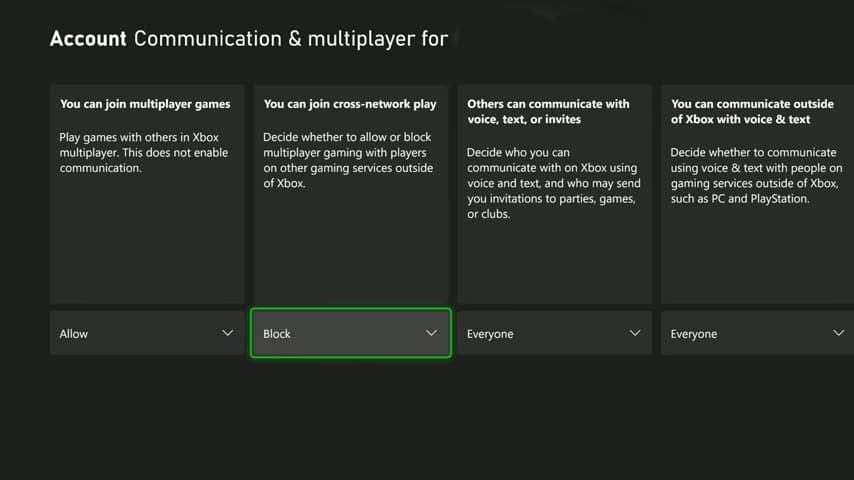
For Xbox users, the process differs slightly from in-game adjustments. To manage crossplay settings on Xbox, begin by exiting the game and navigating to the console’s Settings menu. From there, follow this path: Online Safety and Family > Privacy and Online Safety > Xbox Privacy > View Details & Customize > Communication & Multiplayer. Within this menu, you can modify the setting that allows cross-network play, simply changing it to «Block» to disable crossplay. It’s important to note that this change applies to all games, not just Black Ops 7. To restore crossplay functionality, repeat the steps and select «Allow» instead.
In contrast, PlayStation users enjoy a more streamlined approach to adjusting crossplay settings. Within the game, players can access the Settings menu and click on «Account & Network.» Here, options are available to turn crossplay on or off for various modes, including Multiplayer Unranked and Warzone Ranked. Simply toggle the dropdown for the desired mode to disable crossplay. PlayStation also allows users to specifically turn off crossplay with PC players, which can be a strategic choice for some.
However, PC players face limitations in this aspect; they are unable to disable crossplay at all. This design decision by the developers likely aims to ensure a robust matchmaking experience, although no official explanation has been provided. Historically, PC players did not have this option in previous titles, such as Black Ops 6.
The debate surrounding crossplay centers on balance and competitiveness. Many believe that mouse and keyboard users generally have an advantage over their console counterparts. Yet, some console players argue that the aim assist provided to them may give an unfair edge against PC players. This multifaceted dynamic often leaves gamers divided on their preference for crossplay–which might enhance matchmaking diversity or disrupt the competitive balance.
Ultimately, the decision to enable or disable crossplay comes down to personal preference and the player’s chosen platform. Console gamers often opt out to avoid potential encounters with highly skilled PC players or concerns about cheating. However, disabling crossplay limits the ability to team up with friends across platforms. For PC enthusiasts, this choice is moot, as crossplay remains a constant in the Call of Duty experience.







