
Most functions in NBA 2K26 are straightforward, yet some actions–such as inviting friends to MyCourt–might not be immediately obvious. If you’re having difficulty locating the option to send MyCourt invites in NBA 2K26, we’ve got you covered.
The newest version of NBA 2K was released on September 5, presenting gamers with a more compact yet lively City, significant advancements in movement technology, and numerous exciting features to discover. Although the City is smaller this time around, identifying specific points of interest can be challenging with all the activity on the map.
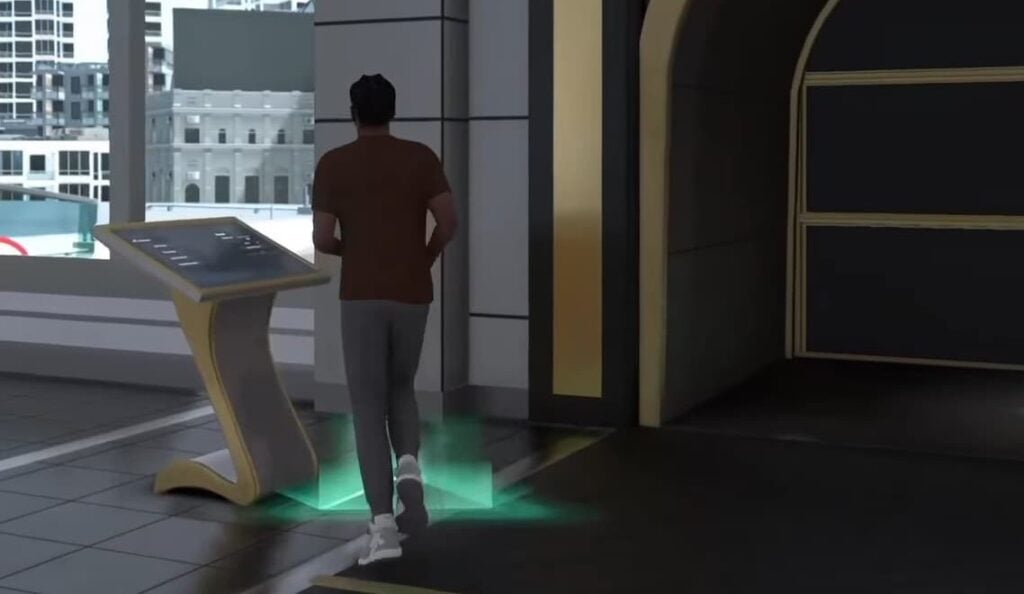
To invite other players for relaxed games in NBA 2K26, you’ll need to find a particular kiosk, which can be easily overlooked in the lively environment. Below are the steps to do so.
How to Invite Friends to MyCourt in NBA 2K26
To locate the kiosk and invite friends to your MyCourt in NBA 2K26, follow these steps:
- Start MyCareer mode.
- In the City, navigate towards the MyCourt building. Enter it to access your private area.
- Once in your MyCourt, look for a distinct kiosk featuring a triangle glowing in green at its base. Approach it to see a prompt to open MyCourt Kiosk using the specific key for your platform.
- When you enter, check for a Social tab on the right. Ensure you’re online: the toggle should be activated and green, with an option to «Go offline» visible. Being online will allow you to see additional options.
- Activate the «Friends can join» option. Then, select Invite Friends to view the list of people available for invites. Choose a friend’s name, opt for View Gamertag, and then click on Invite Friend. You can invite up to five players to join your MyCourt.
- You can also add new friends from this screen. Just use the search function to locate them by their gamer tags.
NBA 2K26 allows crossplay, but only between Xbox and PlayStation users. If you’re on PC or Nintendo Switch and wish to partner with friends, that won’t be possible. If you’re using Xbox or PlayStation, ensure crossplay is enabled in the settings before attempting to invite friends who are on different platforms.
If you’re lacking friends in NBA 2K26 but still wish to practice teamwork, you can choose the Invite AI Players option at the kiosk instead of inviting friends. From there, select up to five AI players to confirm your choice.
Should you find that no kiosk is visible in your MyCourt or the kiosk menu is unresponsive, it might be a glitch. Restarting NBA 2K26 should resolve these minor issues.







