
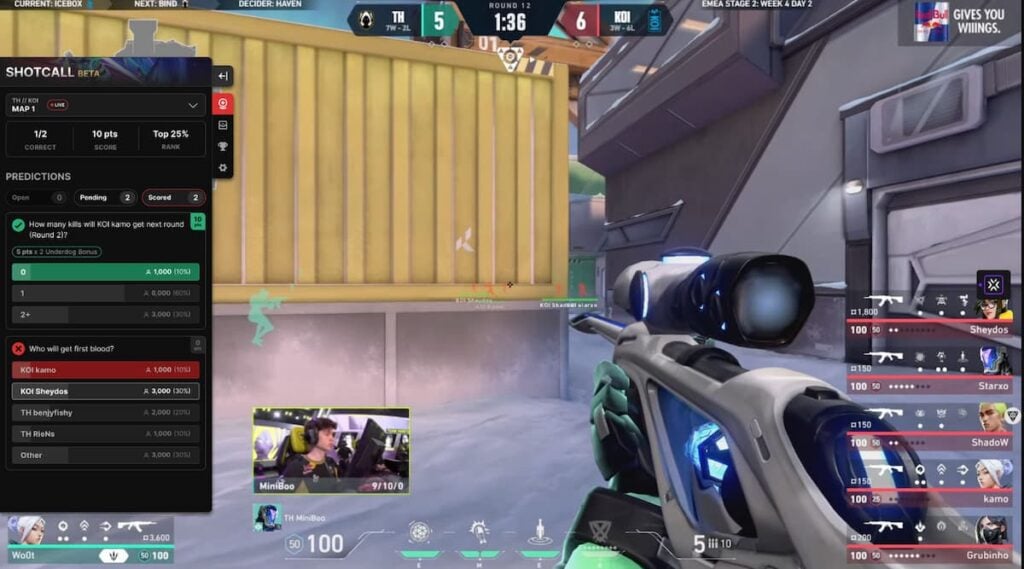
Have you ever wanted VALORANT to reward you for making accurate esports predictions? Riot Games is introducing Shotcall, a feature designed to provide an engaging mini-game experience during the live action of the VCT that fans already enjoy.
Announced on August 5, Shotcall allows players to make «real-time predictions about upcoming events in a VALORANT match.» You can forecast the final statistics of your favorite players or teams and predict the victors in high-pressure matches. These questions test not only your knowledge of the VCT world but also your ability to make informed guesses.
If you believe you’re capable of climbing to the top of the leaderboard–and earning some thrilling rewards along the way–this guide will provide all the information you need about Shotcall in VALORANT Esports.
What is Shotcall in VALORANT Esports?
Shotcall is a new extension for Twitch, available on the official VCT Esports channels. When activated, it allows users to engage in prediction games about the ongoing matches. Correct entries earn points towards a leaderboard, along with potential in-game rewards for reaching specific ranks or correctly forecasting multiple outcomes.
It’s important to note that Shotcall is only available on desktop. Users won’t be able to access it on mobile devices while streaming VCT matches. To utilize Shotcall, you’ll need either a PC or laptop, or you can use the desktop version of Twitch via a mobile browser as an alternative.
How to Utilize Shotcall for VCT Predictions (Limited Beta Schedule)
Currently, Shotcall is in beta testing and is still being refined, meaning it won’t be accessible for every professional VALORANT match in the immediate future.
During the first limited public beta, you can access Shotcall on any of the three official VCT Americas Twitch channels, but only on specific dates:
- August 8
- August 15
- August 22
- August 29
All of these dates are Fridays, hence the term «Shotcall Fridays.» However, Riot has not confirmed whether the feature will be offered on all VCT match days or just Fridays after its official launch.
To make predictions with Shotcall during a beta session, simply follow these steps:
- Watch any of the three VCT Americas official channels on a beta day.
- Locate the red crystal ball icon in the upper-left corner of the stream to access the overlay, and sign in using your Riot account.
- If the red crystal ball isn’t visible, ensure Shotcall is enabled. Find the Twitch extension controls icon on the right side of the video, select it, and verify that Shotcall is set to «visible.»
Once Shotcall is displayed on your screen, you can finalize your VCT predictions and accumulate points and rewards for accurate responses.
Rewards for Participating in Shotcall during VALORANT Esports
As of now, Riot has not disclosed the rewards for those taking part in Shotcall’s inaugural beta sessions starting on August 8. We will provide updates once more information becomes available.
At present, participants can earn one reward across all four beta events. Riot has indicated that more engaging rewards will be introduced for Shotcall in the future, so be sure to share any feedback regarding issues encountered during these beta tests to assist in expediting the final release.







