
Dune: Awakening is an MMO that merges survival and RPG elements. Even before its official launch, the game attracted a significant player base, reaching almost 120,000 concurrent users on Steam. Its expansive world promises ongoing updates, as is typical for MMOs.
This indicates that players may frequently encounter various network and client issues during the initial weeks following the launch. If you encounter the «outdated client m52 error» while playing Dune: Awakening, here’s what it refers to and how you can resolve it.
Understanding the Outdated Client m52 Error
During gameplay, you might come across the «outdated client m52» error after the implementation of a new update, a hotfix, or after server maintenance is completed. This error signals that your launcher is not running the most recent version, even if you have successfully downloaded and installed the latest updates.
Resolving the Outdated Client m52 Error
The development team is aware of this issue and has indicated that launching the game immediately after an update or following planned server maintenance can trigger this error. It’s not an indication of a problem on your part; the team recommends waiting several minutes before trying to relaunch the game.
According to the official announcement on their Discord channel:
Please note that when servers come back online, you may encounter a "version mismatch" error if you try to connect immediately. This should only last for about ~10 minutes after the server is up, so if it occurs, there’s no need to worry.This implies that your best course of action is to wait around 10 to 20 minutes before attempting to connect again.
Extra Troubleshooting Steps
Besides the developers’ suggestion to wait, there are additional measures you can take to confirm that both the client and game are up to date.
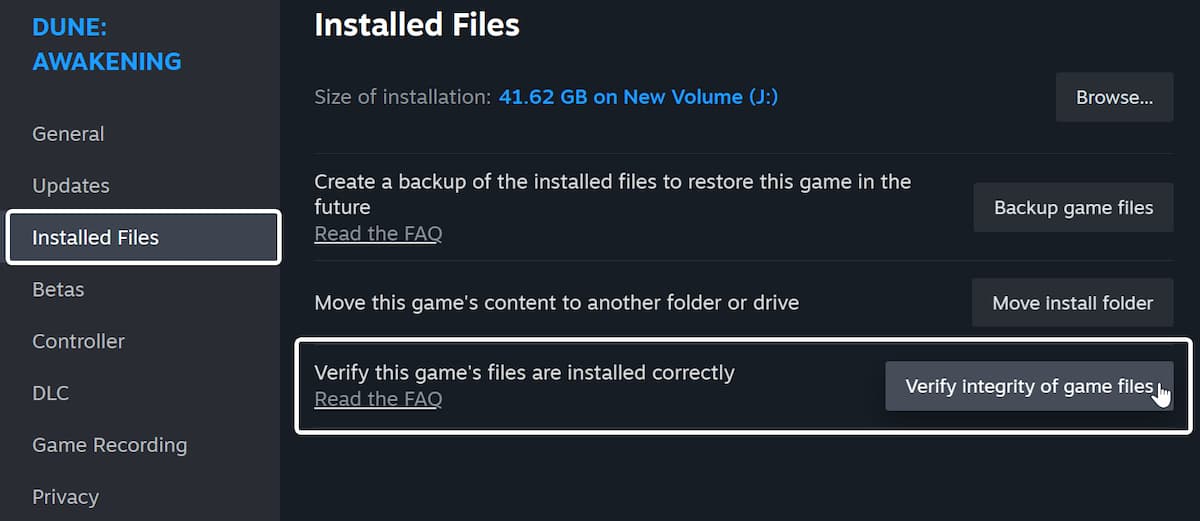
Check Game Files
- Launch Steam and go to your library
- Right-click on Dune: Awakening and select Properties
- Under the Installed Files tab, click on Verify integrity of game files
Set Priority for Updates
To ensure that Dune: Awakening is updated automatically and prioritized, adjust its update settings in Steam.
- Open Steam and head to your library
- Right-click on Dune: Awakening and choose Properties
- In the Updates tab, select «Immediately download updates» for automatic updates.
In conclusion, the «outdated client m52» error is often a temporary issue that will require you to wait it out in Dune: Awakening. This error may arise following significant updates if you attempt to log in immediately afterward.







