
If you’re one of those players who has stuck with the same VALORANT nickname for over two years, it might seem dull to admit it. However, if you’re someone who enjoys changing things up or needs to move on from a less-than-ideal choice, this guide will show you how to alter your name in VALORANT.
Your VALORANT identity is referred to as your Riot ID, which consists of a Game Name and a Tagline, and is applicable across all titles by Riot, such as League of Legends, Legends of Runeterra, 2XKO, and more. Therefore, this guide will teach you how to change your Riot ID.
Quick Summary
- You are allowed to change your Riot ID or VALORANT name for free once every 90 days.
- The name change can be made through the Riot account management page.
- Your Game Name and Tagline must form a unique combination.
- Avoid using offensive or inappropriate language in your VALORANT name.
How to Change Your VALORANT Name
Your VALORANT nicknames or Riot IDs can include letters, numbers, and special characters. To update your name, follow these steps.
Step 1: Exit the Riot Client Application
You must log out of the Riot Client application before you can change your Riot ID. Ensure that you are not signed in to the account you wish to modify, or close the app from the system tray.
Step 2: Open Your Browser and Navigate to Your Riot Account Page
Open a web browser and visit the official Riot Account management page. If you’re not already logged in, enter your credentials.
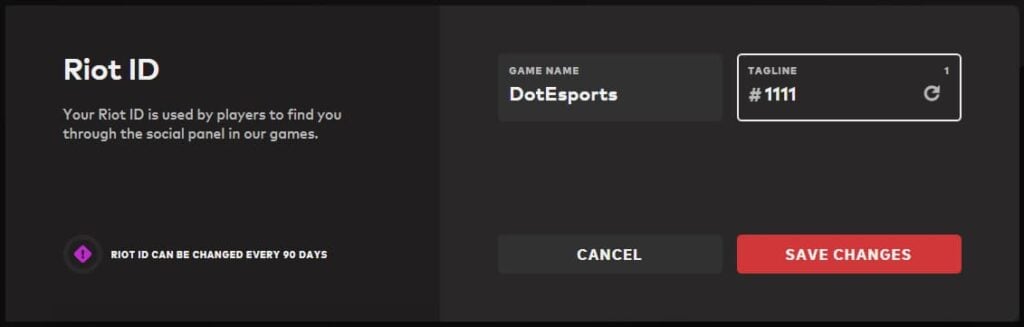
Step 3: Update Your Riot ID
<pOn the account management page, locate the Riot ID tab. Here, you will find sections for your current Game Name and Tagline. Click on the text box to make edits.
You can create your Game Name and Tagline as long as the combination differentiates you from other players. If you’re struggling to find a unique Tagline, use the refresh button to generate one.
Step 4: Finalize Your New VALORANT Name
Once you’re satisfied with your Game Name and Tagline, click on Save Changes. That’s it–you have successfully changed your VALORANT name!
The update might take a few minutes to take effect. You can now log back into the Riot Client application to verify that your new name is active.
Important Information about Changing VALORANT Names
While it would be convenient to change our VALORANT names as often as desired, Riot has set limitations on this process.
Your VALORANT nickname or Riot ID can be modified free of charge once every three months (90 days). Currently, there are no paid options for changing your ID sooner than 90 days. Therefore, before updating your Game Name and Tagline, make sure you are fully satisfied with your choice.
Previously, until November 20, 2023, players could change their Riot ID every 30 days. However, Riot has since modified its protocols to provide one free change every 90 days.
If you’re questioning the absence of a paid option for frequent changes, it’s because Riot experimented with such a system. In the past, changes were permitted annually for free, with fees for more frequent updates. This model faced significant backlash, prompting Riot to reconsider their approach.
At the moment, there is no alternative way–either paid or free–to change your Riot ID other than the aforementioned 90-day interval. However, if your current Riot ID is attracting negative attention and you have not yet exercised your free change, you may submit a support ticket to Riot for assistance.
What to Avoid When Choosing Your VALORANT Name
Knowing the constraints on changing your VALORANT name is valuable, it’s crucial to follow the regulations while selecting your new name. Riot may flag your Riot ID for inappropriate language, potentially penalizing your account if violations persist.
To steer clear of these issues, here are some guidelines to follow:
- Avoid names that imply hate speech, slurs, or profane language.
- Do not reference any historical, ethical, or political themes.
- Refrain from using insults, grotesque imagery, or extreme vulgarity.
If you wish to select a Riot ID from a list of endearing but harmless VALORANT nicknames, feel free to do so–no one will object.
Frequently Asked Questions
-
Q1: Can I include special characters in my VALORANT name?
Absolutely! You can incorporate special characters in your Riot ID.
-
Q2: Is there a cost to change my VALORANT name?
No, changing your VALORANT name is free of charge every 90 days. There are no paid options for changing your Riot ID before this period.
-
Q3: Will my name change impact other Riot games?
Yes, since it serves as your Riot ID, which is used across all Riot games.
-
Q4: Can I modify my Riot account username?
No, your username is fixed post-creation. It differs from your Riot ID or VALORANT name, which is what you display in-game.







