
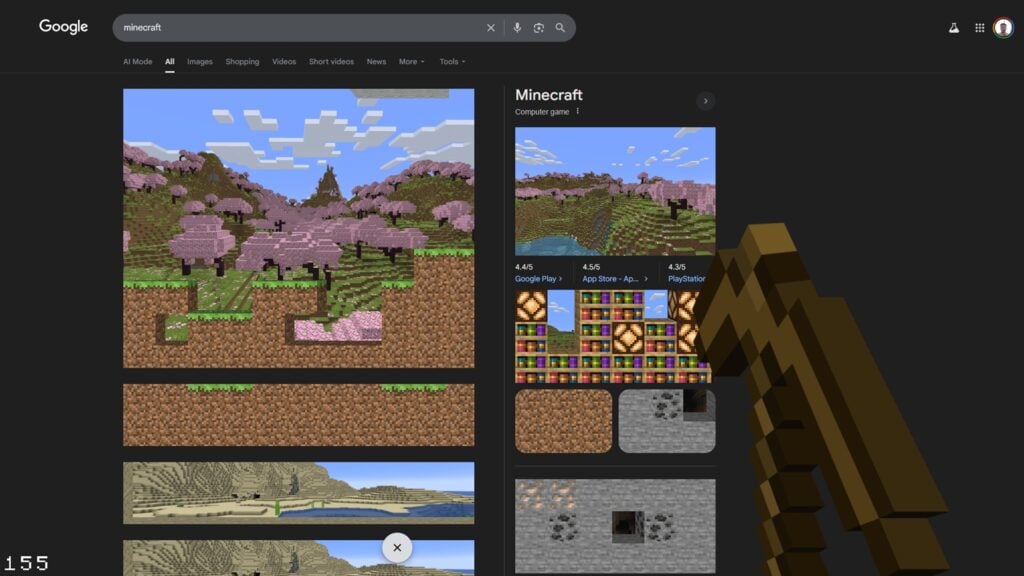
In 2024, Google introduced a unique interactive Easter egg to commemorate the 15th anniversary of Minecraft. This new feature transforms the traditional search results page into an engaging mining adventure, embodying the whimsical nature of the beloved sandbox game. Users can now chip away at virtual blocks directly in their browser, creating an enjoyable homage to the exploration and creativity that Minecraft represents.
Once this feature is initiated, the entire search interface shifts into a digital playground where each click simulates the act of mining. Users can dismantle elements like news sections and individual search results as if they were blocks within the game, each displaying varying levels of resistance based on their composition. This clever integration pays homage to Minecraft’s core mechanics, providing fans with a delightful surprise that seamlessly combines nostalgia, interactivity, and Google’s characteristic humor.
Here’s everything you need to know about exploring Minecraft on Google search.
Celebrating Minecraft’s 15th Anniversary on Google
To activate this fun Easter egg, simply search for «Minecraft» or «Minecraft Bedrock Edition.» Once the results load, a recognizable grass block icon from the game will appear at the bottom of the screen.
By clicking this icon, your cursor shifts to resemble Steve’s iconic pickaxe, unlocking an interactive mining function that instantly immerses you in the Minecraft universe within your browser. As you scroll down the page, it gradually evolves into a multi-layered Minecraft landscape abundant with caves, ores, and unique biomes.
You’ll be able to mine through stone and dirt and even discover rare items like TNT or materials from the Nether realm. A live counter on the left side indicates how many blocks you’ve broken, adding an entertaining sense of achievement to the experience.
This Easter egg features authentic sounds and animations from the game, ensuring it aligns with Minecraft’s genuine aesthetic. When you’re finished, simply click the X button at the bottom to conclude your adventure with a gratifying Creeper explosion, clearing the scene and returning you to a standard Google search layout.
For additional information on Minecraft, be sure to check out our guides on the best village seeds and how to enable Vibrant Visuals.







