
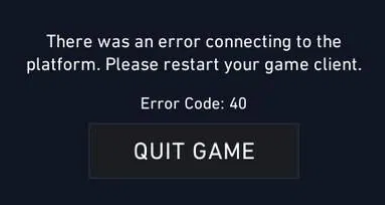
If you are experiencing difficulties launching or playing VALORANT and encountering error code 40, don’t worry–you’re not alone. This issue has been reported by numerous players since the game’s release, and we’re here to help you resolve it.
As an online title, VALORANT can often run into problems triggered by both client-side and server-side issues. The likelihood of these errors is heightened around major updates, when server modifications are made or when player traffic peaks. Some errors, like code 40, are infrequent and may arise unexpectedly due to minor disruptions, but there’s no need for concern.
Below, you will find an explanation of the VALORANT error code 40 and potential solutions to address it.
Understanding VALORANT Error Code 40 and Solutions
Error code 40 in VALORANT is accompanied by a message stating: «There was an error connecting to the platform. Please restart your game client.» At first glance, it indicates a connection problem. But what causes it?
In essence, error code 40 typically points to a temporary issue on Riot’s servers. This may occur while trying to start the game, during a match, or in the lobby. It’s often seen when the servers go offline while you’re engaged in gameplay or if a bug is affecting VALORANT in your area. Generally, patience is required as developers work to resolve these disruptions. That said, a connection issue on your end might also be the culprit.
If you currently face error code 40 in VALORANT, you should try the following solutions in order to potentially rectify the issue:
- Verify if the servers are undergoing maintenance. Riot often takes servers offline just before releasing an update, so if you’re anticipating a new patch, this could be the reason. You might also check with friends in your area to see if they are experiencing similar issues. Regardless of the cause, if the servers are down, you’ll need to wait for Riot to restore them and download any updates to eliminate the VALORANT error code 40 before you can resume playing.
- Follow the instructions given in the error message. Restart both the game and the Riot Client. If this doesn’t work, consider logging out of the client and then logging back in.
- Sometimes, simply restarting your computer or console can resolve the VALORANT error code 40.
- Attempt to run VALORANT with administrator privileges.
Fortunately, error code 40 is not a frequently occurring issue in VALORANT, but if it does appear in the future, you are now prepared with the necessary information. Alternatively, you can always reach out to Riot Support for assistance.







